
PRO feature OfferPact Checkout Pro 1.0.4 · Requires the Free plugin
Pro License and Updates
This guide explains how your OfferPact Checkout Pro license works after installation: seats, status checks, signed updates, renewal, cancellation and what happens when a license is no longer active. To install and activate Pro for the first time, see Pro Installation & Activation.
Your license at a glance
- Price: USD $99 per year. It renews automatically every year until you cancel.
- Sites: active on up to two WordPress installations at the same time.
- Includes: Pro features and signed Pro updates while the license is active.
- Always free: the OfferPact Checkout Free plugin keeps processing one-time payments whatever your license status.
- Stripe and PayPal charge their normal processing fees for payments on your site; IVIA CODE adds no transaction fee.
The Pro License screen
Go to OfferPact Checkout → Pro License. The screen, titled OfferPact Checkout Pro — License & Updates, has two panels.
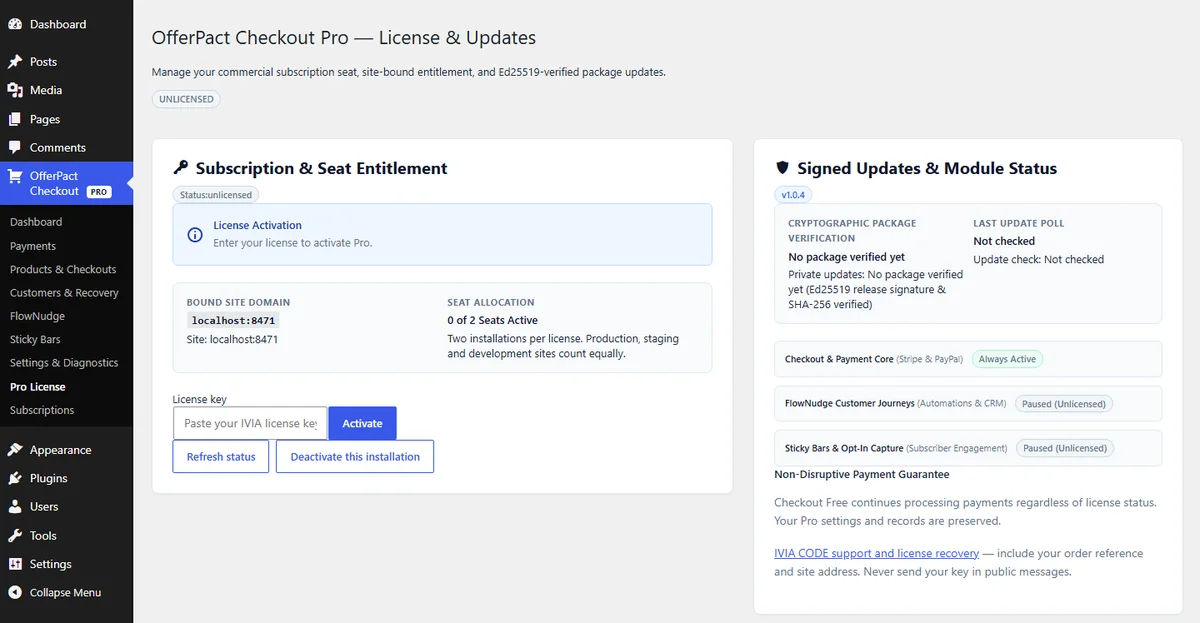
Subscription & Seat Entitlement shows the status, the Bound Site Domain, Seat Allocation (for example “1 of 2 Seats Active”), the installation ID and the last verified paid-through date. Its buttons are:
- Activate — activates the key you paste for this site.
- Refresh status — checks the license again now, for example right after a renewal.
- Deactivate this installation — frees this site’s seat.
Signed Updates & Module Status shows the installed version, the result of the last package verification, the last update check, and whether FlowNudge Customer Journeys and Sticky Bars & Opt-In Capture are Entitled & Active or paused. Checkout & Payment Core is always active.
Seats: using Pro on two sites
- Each WordPress installation where you activate the key uses one seat. Production, staging and development sites count equally.
- To move a seat, click Deactivate this installation on the old site first, then activate the key on the new site.
- Deactivating the Pro plugin on the Plugins screen also releases its seat. When you activate the plugin again, enter the same key again.
- If the site address changes (for example a new domain), Pro reports “The site address changed”. Deactivate the old installation and activate the new address.
- Changing your WordPress security salts can require reactivation, because the site token is encrypted with them.
How the license is checked
Pro checks the license in the background and whenever you open the Pro License screen. Checks never run on checkout or payment pages. Each check sends your site token, site address and plugin version to the IVIA CODE license service; update checks also send your WordPress and PHP versions. The license key itself is sent only when you click Activate or Deactivate and is not stored on your site.
If the license service cannot be reached, Pro keeps working for seven days from the last verified check and shows that verification is unavailable. After seven days without verification, Pro features pause until a check succeeds. Free checkout and your data are not affected.
Signed updates
When a new Pro version is available and your license is active, it appears in Dashboard → Updates and on the Plugins screen. Click Update now. Before WordPress installs it, Pro verifies that the package is signed by IVIA CODE. If verification fails, the update is refused with “The private update could not be verified. Refresh the Pro license screen and retry.” Updates are not available while the license is inactive.
Before updating, back up your site and keep the Free plugin at the version required in the release notes.
Renewal
Your license renews automatically each year at the price shown at purchase. The purchase email states your paid-through date. After a renewal, click Refresh status if the screen still shows the old date.
Cancel automatic renewal
- Use Manage Subscriptions on this website: enter the email you used for the purchase and follow the secure link.
- If you paid with PayPal, you can also cancel in your PayPal account under automatic payments.
Cancellation stops future renewals. Pro keeps working until the end of the period you have paid for; then Pro features pause. Refunds follow our Cancellation & Refund Policy; a refunded license is deactivated.
When a license is no longer active
After expiry, cancellation at period end, refund or revocation:
- The Free plugin keeps selling one-time products normally.
- FlowNudge stops sending and holds due tasks; Sticky Bars are no longer shown.
- New subscription checkouts pause. Subscriptions you already sold are not canceled: they keep renewing at Stripe or PayPal, stay synchronized and can still be canceled by you or your customers.
- Your settings, contacts, journeys and subscription records stay in your WordPress database.
- Signed updates are unavailable.
After you renew and the status is active again, held FlowNudge tasks are not replayed automatically. Review them in FlowNudge → Activity & Logs and release them one at a time with Release Held Task.
Status messages
| Message | Meaning and action |
|---|---|
| License response verified. All OfferPact Checkout Pro modules and signed updates are active for this site. | Everything is working. |
| Your subscription is no longer entitled. Renew your subscription and refresh. | The license has expired. Renew, then click Refresh status. |
| This license has been revoked. Contact IVIA CODE support for recovery. | Contact support with your order reference. |
| Verification is unavailable. Pro remains available for seven days… | The license service could not be reached. Check outbound HTTPS from your server. |
| Seven days have passed without verification. Pro is paused… | Restore connectivity and click Refresh status. |
| The site clock moved backwards… | Correct the server time, then refresh. |
| Activate this site again using your license key. | The stored site token is no longer valid; activate the key again. |
Lost key or purchase email
There is no online customer account. Email support@iviacode.com from the address you used for the purchase, with the purchase date and payment method. Never send card details or passwords.
Related guides
IVIA CODE newsletter
Stay up to date with new OfferPact features and advanced WordPress checkout techniques
Occasional emails about new OfferPact features, practical checkout tips and conversion ideas for WordPress businesses.